




COB vs SMD LED Display
By hyderali
Oct 14, 2026


COB vs SMD LED Display: The Complete Guide to Differences, Cost and How to Choose (2026)
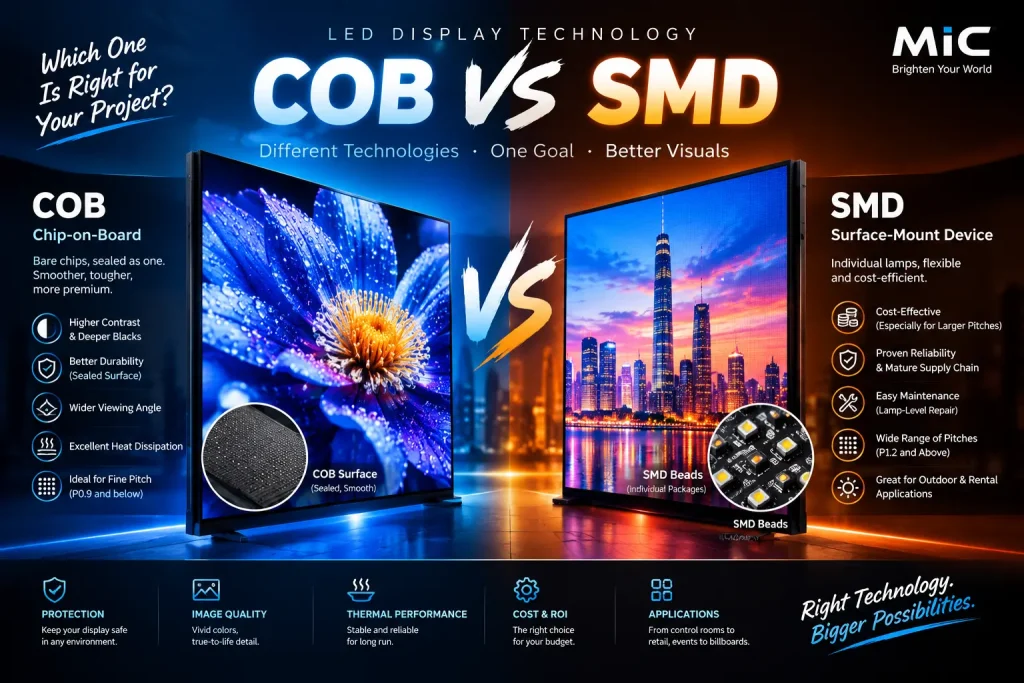
COB vs SMD LED display is the most important technology decision in any indoor fine-pitch project. SMD (Surface-Mount Device) is the proven, affordable standard. COB (Chip-on-Board) is the newer, sealed, flip-chip approach that now leads wherever pixel pitch drops below P1.2 and wherever durability, close-range image quality and 24/7 reliability matter more than the lowest purchase price.
At MIC, a Shenzhen-based LED display manufacturer with 15+ years of experience and a 10,000 m² production facility, we build indoor, outdoor, rental, COB and custom LED screens for customers in more than 100 countries and regions. This guide is the complete reference we give our own customers: how each technology works, how they compare on 12 measurable factors, what each really costs over its life, how to match pixel pitch to viewing distance, and how to write a specification that protects your budget.
Quick Answer: COB or SMD?
- Choose COB for pixel pitch of P0.9 and finer, viewers closer than about 1.5 m, 24/7 operation, touch or high-traffic areas, and the lowest total cost of ownership over 5+ years.
- Choose SMD for budget-limited projects, pitches of P1.5 and above, long viewing distances, outdoor advertising and sites that need lamp-level field repair.
- Consider GOB or MIP when you want better protection than bare SMD without paying the full COB premium.
- Never buy finer than your audience can see. Match pitch to the real minimum viewing distance first, then choose the technology.
In This Guide
- How LED packaging evolved: DIP, SMD, GOB, COB, MIP and Micro LED
- What is an SMD LED display?
- What is a COB LED display, and what is flip-chip COB?
- COB vs SMD: the complete comparison table
- Image quality, durability, thermal, power and reliability explained
- Maintenance and repair: what changes with COB
- Total cost of ownership: a framework you can use
- Pixel pitch, resolution and viewing distance, with worked examples
- GOB, MIP and Micro LED: where they fit
- Which technology for which application
- A 7-step selection process and RFQ checklist
- Myths about COB and SMD
- FAQ
How LED Packaging Evolved: DIP, SMD, GOB, COB, MIP and Micro LED
Every LED screen is a grid of tiny light sources, and the real difference between technologies is how those light sources are packaged and protected.
| Generation | What it is | Typical use today |
|---|---|---|
| DIP | Through-hole lamps, large and bright | Legacy outdoor boards |
| SMD | Individually packaged LED beads soldered to the PCB surface | Most indoor, outdoor and rental screens |
| GOB | SMD with a protective glue layer over the surface | Rugged indoor and rental, P1.2 to P2.5 |
| COB | Bare chips on the board, sealed under one resin layer | Fine pitch, control rooms, studios, premium retail |
| MIP | Micro-LED chips in individual micro-packages, mounted with SMT lines | Ultra-fine pitch, flexible rental and staging |
| Micro LED | Microscopic chips, often mass-transferred | Emerging premium and wall-scale displays |
The trend is clear: each step gives denser pixels and more protection, at a higher manufacturing cost. COB and SMD are the two technologies most buyers actually choose between today, which is why this guide focuses on them.
What Is an SMD LED Display?
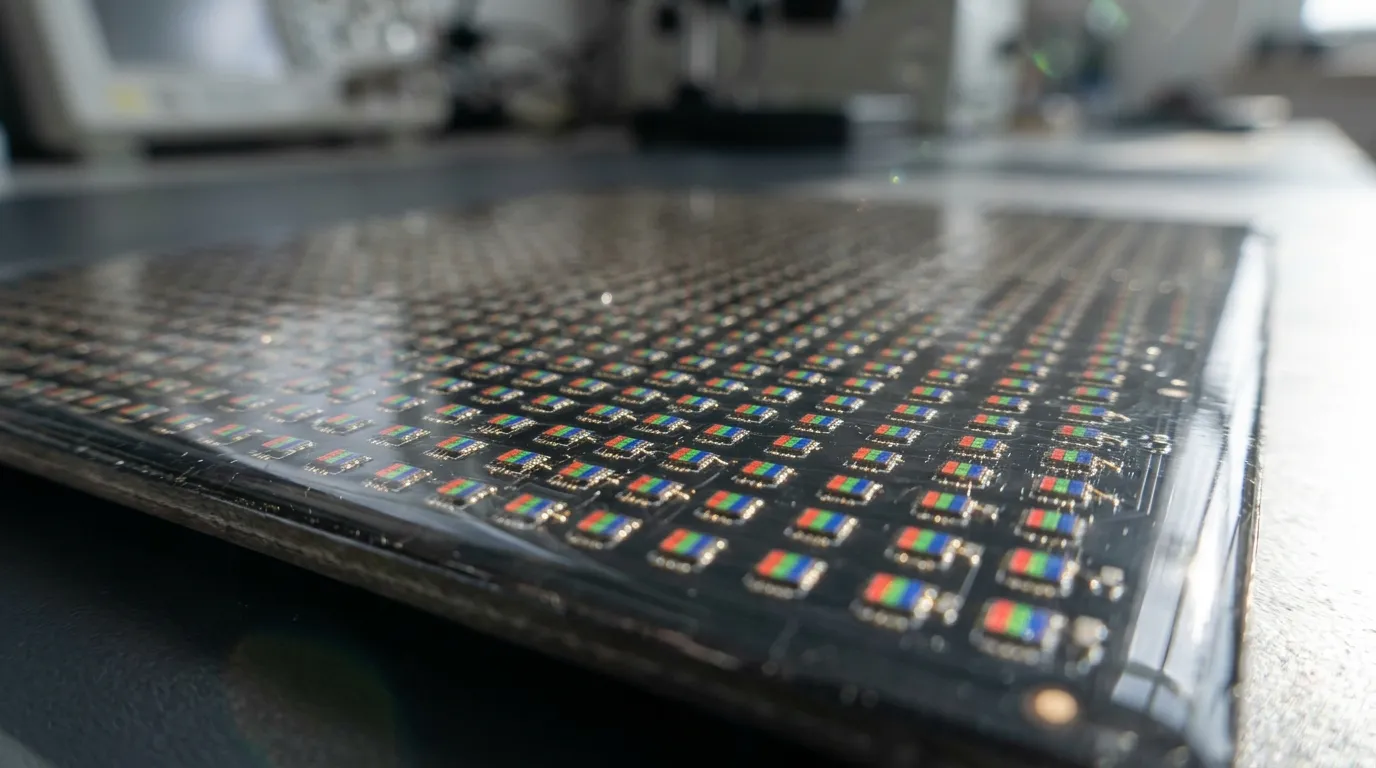
An SMD LED display uses individually packaged LED lamp beads. Each bead contains its own chip, phosphor, lens and solder pads. The beads are soldered onto the PCB with standard pick-and-place and reflow equipment, so every LED is a discrete point light source sitting exposed on the board surface.
Strengths of SMD
- Mature supply chain and the lowest cost per square meter
- Fast production and wide availability of pitches from P1.2 to P10 and beyond
- Easy lamp-level or module-level service in the field
- Proven in indoor, outdoor and rental use
Limits of SMD
- The package body limits how closely beads can be placed, so image quality at close range stops improving below roughly P1.2
- Exposed lamps are vulnerable to knocks, moisture, dust and cleaning damage
- More components and solder joints mean more potential failure points
- A longer thermal path from chip to heat sink
For standard indoor installations, see our indoor LED display range, including the MC-S Indoor Fixed LED Display and the MC-PRO Indoor LED Video Wall.
What Is a COB LED Display?
A COB (Chip-on-Board) LED display skips the individual package. Bare LED chips are bonded directly onto the PCB, then the whole array is sealed under one continuous layer of optical-grade epoxy or silicone resin. The surface behaves like a uniform light-emitting panel rather than a grid of separate bulbs.
Formal COB vs flip-chip COB
Not all COB is equal. Formal (wire-bonded) COB mounts chips face up and connects them with fine gold wires, which limits how small the pitch can go and adds failure points. Flip-chip COB mounts chips upside down so their contacts bond directly to the PCB traces. There are no wires, the thermal path is shorter, the chips can sit closer together and the viewing angle is wider. When a quote says COB, always ask which structure it uses.
How COB LED displays are made
- Die bonding: automated equipment places bare LED chips precisely on the PCB substrate.
- Electrical interconnection: flip-chip architecture bonds the chip contacts straight to the PCB, removing wire bonds.
- Resin encapsulation: the full array is sealed under one protective layer, forming a single surface across the module.
- Surface treatment: the resin is finished, often with a deep black coating that lifts contrast.
- Testing and calibration: modules are burned in, tested and color-calibrated before assembly into cabinets.
With no individual packages, chips can sit much closer together. That improves durability and makes P0.9, P0.6 and P0.4 practical for a fine pitch LED display.
Explore our COB LED display range and the MC-COB Fine Pitch COB LED Display.
COB vs SMD LED Display: The Complete Comparison
| Factor | SMD LED | COB LED |
|---|---|---|
| Light source | Point source per chip | Uniform area light |
| Typical pixel pitch | P1.2 and above | Below P1.2, down to P0.4 |
| Surface protection | Low, exposed lamp beads | High, full resin encapsulation |
| Typical front IP rating | IP20 to IP30 | IP54 or higher |
| Impact and scratch resistance | Low | High |
| Cleaning | Delicate | Wipeable |
| Viewing angle | About 140 to 160 degrees | Up to 170 degrees or more |
| Contrast and black level | Moderate | Higher, with black-coated encapsulation |
| Thermal path | Chip, glue, solder, PCB, heat sink | Chip direct to PCB |
| Power consumption | Higher | Lower |
| Close-up image | Can look grainy | Smooth |
| Failure points | More components and solder joints | Fewer |
| Field repair | Lamp or module level | Module level |
| Upfront cost | Lower | Higher |
| Total cost over 5+ years | Higher in demanding use | Often lower |
Figures are typical industry ranges. Exact values depend on the manufacturer and model, so always confirm them in the product datasheet.
Where COB Wins: Five Measurable Advantages
1. Image quality at close range
COB replaces individual point sources with a continuous surface, so images stay smooth when viewers stand close. SMD can show a dotted or grainy look at short distances, which matters in boardrooms, control rooms, showrooms and any space where people sit near the screen for long periods.
2. Contrast, black level and viewing angle
Encapsulation can be finished with a deep black coating that limits light leakage between pixels, giving deeper blacks and higher perceived contrast. Flip-chip structures also widen the usable viewing angle, so color and brightness stay consistent across more seats. For reference, our indoor HD range lists more than 110% NTSC color reproduction and a viewing angle above 170 degrees.
3. Durability and protection
The sealed resin layer protects the chips far better than exposed SMD beads. COB panels commonly reach IP54 on the front, while standard SMD is usually IP20 to IP30. The surface is wipeable, anti-static and more resistant to accidental knocks, which suits touch-interactive installations, retail floors and low-mounted video walls. In practice, this is where most of COB's total-cost advantage comes from, because far fewer pixels are lost to handling damage.
4. Thermal performance and power use
Chips bonded directly to the PCB, especially in flip-chip designs, shed heat through a short path. Cooler operation extends diode life, reduces color drift and lowers energy use in continuous operation. If a screen runs 16 to 24 hours a day, thermal design is as important as pixel pitch.
5. Pixel density and long-term reliability
Without bulky packages or wire bonds, COB packs LEDs more tightly, which is why P0.9, P0.6 and P0.4 are realistic with COB but not with standard SMD construction. Fewer components and solder joints also mean fewer places for a fault to start, a major reason mission-critical sites choose COB.
Where SMD Still Wins
- Lower upfront cost: SMD does not need the cleanroom-grade die-bonding equipment COB requires, so the price gap per square meter is significant.
- Large formats and long viewing distances: for big indoor walls and advertising screens viewed from afar, COB's close-up smoothness is invisible to the audience.
- Easier field service: individual SMD lamps can sometimes be reworked with standard tools, while COB usually needs module replacement.
- Pitch range and availability: SMD covers coarse pitches that COB makes no commercial sense for.
- Outdoor use: outdoor SMD screens with IP65 protection are the proven standard. See our outdoor LED display range and the MC-PRO Outdoor Fixed LED Display with front and rear maintenance.
Maintenance and Repair: What Changes With COB
This is the most misunderstood part of the decision.
- SMD repair: technicians can sometimes replace a dead lamp or a small module with a soldering iron. That is cheap, but exposed lamps are also more likely to be damaged in the first place.
- COB repair: the sealed surface cannot be reworked on site, so repair means swapping a module, or returning it for calibration. Failure rates are lower, but each repair is a module-level job.
Practical rules for COB projects
- Order spare modules from the same production batch so color matches after replacement.
- Keep spares on site for critical installations, so a swap takes minutes instead of days.
- Confirm in writing how modules are calibrated and who supplies calibration data.
- Agree warranty scope for dead pixels and module replacement before the order. See our warranty terms.
Total Cost of Ownership: A Framework You Can Use
Upfront price is only part of the cost. Compare both technologies with this formula over a realistic 5 to 8 year life:
Total cost of ownership = purchase price + installation + energy + maintenance and spares + downtime cost + replacement or refresh
| Cost element | Why it differs between SMD and COB |
|---|---|
| Purchase price | COB is higher per square meter |
| Energy | COB's cooler operation can reduce power use in 24/7 screens |
| Maintenance | Fewer damaged pixels and fewer solder joints with COB, but module-level repair |
| Downtime | Critical sites (control rooms, studios) lose far more from an outage than the price gap saves |
| Appearance over time | Exposed SMD lamps degrade and get damaged in high-traffic areas |
The more your screen is touched, cleaned, watched closely or run continuously, the more the total cost favors COB. The more it hangs high on a wall and is viewed from a distance, the more it favors SMD. Ask every supplier to quote both options for the same project so you can compare on this basis.
Pixel Pitch, Resolution and Viewing Distance
Rule of thumb for viewing distance
A common guide puts the minimum comfortable viewing distance in meters at roughly 1 to 3 times the pixel pitch in millimeters. Use the lower end for premium image quality and the upper end for general viewing.
| Pixel pitch | Typical minimum viewing distance | Typical technology |
|---|---|---|
| P0.9 | About 1 m | COB |
| P1.2 | About 1.2 to 1.5 m | COB, MIP or SMD |
| P1.5 | About 1.5 m or more | SMD, GOB or COB |
| P1.8 | About 1.8 m or more | SMD or GOB |
| P2.0 to P2.5 | About 2 to 3 m or more | SMD or GOB |
Our indoor HD range covers pixel pitches from P0.9 to P2.5, so you can match the pitch to the room instead of overspending.
Worked example: resolution of a 3.84 m by 2.16 m wall
Pixel count equals the physical size divided by the pitch.
| Pixel pitch | Horizontal pixels | Vertical pixels | Resolution |
|---|---|---|---|
| P2.5 | 1,536 | 864 | Below Full HD |
| P1.8 | 2,133 | 1,200 | About 2K |
| P1.2 | 3,200 | 1,800 | Near QHD |
| P0.9 | 4,267 | 2,400 | Above 4K horizontally |
If your content is Full HD or 4K, choose the pitch that matches your signal and viewing distance. Paying for P0.9 to show Full HD content from 6 m away gives no visible benefit over a coarser, cheaper pitch.
Other specs that matter as much as pitch
- Refresh rate: for filmed, streamed or broadcast spaces, look for at least 3,840 Hz to avoid scan lines and flicker on camera. Our product lines list refresh rates of 3,840 to 7,680 Hz.
- Brightness: indoor screens for controlled lighting need far less brightness than outdoor ones. Too much brightness causes eye fatigue in close viewing, so choose a controllable range.
- Grayscale and calibration: high bit depth and factory calibration keep skin tones and dark scenes clean.
- Color uniformity across modules: batch matching and calibration prevent patchwork color on large walls.
GOB, MIP and Micro LED: Where They Fit
Two packaging technologies sit between SMD and COB, and a third is emerging above both.
- GOB (Glue-on-Board): standard SMD lamps with a protective epoxy coating over the surface. Better impact and moisture resistance than bare SMD at a lower cost than full COB. A good fit for rental and high-traffic indoor screens around P1.2 to P2.5.
- MIP (Micro LED in Package): micro-LED chips housed in individual micro-packages and mounted on standard SMT lines. Its supporters argue it suits ultra-fine pitch and serviceable, reconfigurable rental walls, while COB suppliers argue sealed COB gives better uniformity and robustness.
- Micro LED: very small chips, often transferred in volume, aimed at premium and wall-scale displays. It is advancing quickly, and MIC continues to invest in Micro LED and transparent display technology.
| Technology | Ideal pixel pitch | Physical protection | Relative cost | Best for |
|---|---|---|---|---|
| SMD | P1.2 and above | Low, exposed | Baseline | Budget, large walls, outdoor |
| GOB | P1.2 to P2.5 | Moderate, surface glue | Low to mid | Rental, retail, rugged indoor |
| MIP | P0.6 to P1.2 | Moderate | Mid to high | Ultra-fine pitch, flexible staging |
| COB | Below P1.2 (P0.9 to P0.4) | High, full encapsulation | Premium | Control rooms, studios, premium retail |
Check which packaging every quote uses. Two P1.2 screens from different suppliers can differ greatly in protection, uniformity and cost.
Which Technology for Which Application?
| Application | Recommended technology | Why | Explore at MIC |
|---|---|---|---|
| Control rooms and command centers | COB | 24/7 reliability, close viewing, uniformity | Data visualization solutions |
| Broadcast and virtual production | COB | High refresh rate, smooth surface, color consistency | COB LED display |
| Boardrooms and meeting rooms | COB | Viewers sit within 1 to 3 m | Indoor LED display |
| Premium retail, showrooms, museums | COB or fine-pitch SMD or GOB | Touch exposure, premium image | Commercial display solutions |
| Shopping malls and exhibition halls | SMD, GOB or COB by distance | Large area, mixed viewing distance | Exhibition hall project |
| Outdoor advertising | SMD with IP65 protection | Brightness, weather, cost per square meter | Advertising display solutions |
| Stage, events and rental | SMD or GOB | Fast setup, rugged modules | Rental LED display |
| Creative and architectural installs | Transparent or custom | Light transmission, shape | Transparent screens |
| Interactive floors | Rugged, load-rated modules | Foot traffic, safety | LED floor display |
See real installations in our project cases, including the shopping mall immersive LED display and the shopping mall 3D LED display.
A 7-Step Process for Choosing Between COB and SMD
- Measure the real minimum viewing distance. Walk the space and measure from the closest seat or walkway, not from the center of the room.
- Pick the pixel pitch from that distance. Use 1 to 3 times the pitch in millimeters as the minimum distance in meters.
- Check the environment. Touch, cleaning, humidity, dust and ambient light all push toward COB or GOB. A sheltered, high wall allows SMD.
- Define operating hours. Screens that run 16 to 24 hours daily benefit most from COB's thermal and reliability advantages.
- Set the content and signal chain. Match resolution, refresh rate and grayscale to your cameras and sources.
- Compare total cost of ownership, not price. Ask for COB and SMD quotes on the same size and compare over 5 to 8 years.
- Plan service. Decide on spare modules, calibration support and warranty scope before you sign.
RFQ Checklist: What to Ask Every Supplier
| Question | What a good answer looks like |
|---|---|
| Is the COB flip-chip or wire-bonded? | A clear structural answer, with datasheet support |
| What is the real pixel pitch and cabinet size? | Exact figures, with pixel resolution per cabinet |
| What is the front IP rating and how was it tested? | A specific rating, not just waterproof or dustproof |
| What is the refresh rate and grayscale? | At least 3,840 Hz for camera use, with grayscale stated |
| What is the brightness range and can it be controlled? | A range suited to indoor use, with auto or manual control |
| How are modules calibrated, and from which batch are spares? | Factory calibration data, with same-batch spares |
| What is the warranty, and what does it cover? | Written terms for modules, power supplies and dead pixels |
| What is the production and quality process? | Burn-in, inspection and testing before shipment |
| Can you customize size, shape and cabinet? | OEM and ODM support with engineering drawings |
Common Myths About COB and SMD
- Myth: COB is always better. COB is better for fine pitch, close viewing and demanding use. For big, distant or outdoor screens, SMD is the smarter spend.
- Myth: A smaller pitch is always better. Pitch beyond what viewers can resolve adds cost without visible gain.
- Myth: COB cannot be repaired. It is repaired at module level, and well-planned spares make this fast.
- Myth: COB is the same from every supplier. Chip quality, flip-chip structure, resin quality and calibration vary widely.
- Myth: SMD is outdated. SMD remains the workhorse for outdoor, rental and large indoor walls, and keeps improving.
Why Choose MIC for COB and SMD LED Displays
- Technology advice that is not biased to one product: we build indoor, outdoor, rental, COB, transparent and custom screens, so we recommend what suits your project, not what we need to sell.
- Manufacturing scale and control: a 10,000 m² production facility, automated production, quality inspection and engineering support, with testing before shipment.
- Fine-pitch capability: indoor HD displays from P0.9 to P2.5 in die-cast aluminum cabinets, with refresh rates up to 7,680 Hz across our product lines.
- Global project experience: 15+ years in the industry and exports to more than 100 countries and regions.
- OEM/ODM and one-stop support: custom sizes, configurations and engineering support from design to delivery.
- Responsive service: 24/7 service response from a dedicated team.
Learn more about MIC, browse all LED display products, or read our latest LED display news.
Frequently Asked Questions About COB vs SMD LED Displays
What is the main difference between COB and SMD LED displays?
SMD uses individually packaged LED beads soldered onto the PCB. COB bonds bare chips directly to the PCB and seals them under one resin layer, giving a smoother, more protected surface and tighter pixel spacing.
Is COB better than SMD?
COB is better for fine pitch, close viewing, durability and long-term reliability. SMD is better for low upfront cost, large formats viewed from afar, outdoor use and easy on-site repair. Neither is better in every case.
Is a COB LED display more expensive than SMD?
Yes, upfront. Over several years, lower energy use, fewer damaged pixels and fewer failures can narrow or reverse the gap in total cost, especially for 24/7 screens.
What pixel pitch should I choose?
Start from the closest viewing distance. A common rule is minimum distance in meters of about 1 to 3 times the pitch in millimeters. A P1.2 screen suits viewers from about 1.2 to 1.5 m, while P2.5 suits 2.5 to 3 m or more.
Which pixel pitches are available in COB?
COB is typically used below P1.2, commonly P0.9, P0.6 and P0.4, though pitch availability depends on the manufacturer. See our fine pitch COB LED display.
Can COB LED displays be repaired?
Yes, but usually at module level rather than lamp level. Keep spare modules from the same batch so color matches.
What is flip-chip COB?
Flip-chip COB mounts the LED chips upside down so their contacts bond directly to the PCB, with no wire bonds. It runs cooler, allows tighter spacing and gives a wider viewing angle than wire-bonded COB.
What is the difference between COB, GOB and MIP?
GOB adds protective glue to SMD lamps. MIP houses micro-LED chips in individual micro-packages. COB mounts bare chips and encapsulates the whole array. They sit at increasing levels of protection and cost.
What IP rating do COB LED displays have?
Front-surface ratings of IP54 or higher are common for COB, versus IP20 to IP30 for typical SMD indoor panels. Always confirm the rating on the datasheet.
Is COB suitable for outdoor use?
COB is mainly an indoor fine-pitch technology. For outdoor advertising and fixed installations, SMD screens with IP65 protection remain the standard. Browse our outdoor LED displays.
What refresh rate do I need for cameras and broadcast?
Look for at least 3,840 Hz to avoid scan lines and flicker on camera. Higher rates give more margin for high-speed or virtual production work.
Can MIC customize COB or SMD displays for my project?
Yes. We support OEM/ODM projects with custom sizes, cabinets and configurations. Send your screen size, viewing distance, environment and budget through our contact page.
More questions? Visit our FAQ page.
Get a Custom COB or SMD LED Display Quote
Share your screen size, viewing distance, installation environment, operating hours and budget. Our engineers will recommend the right technology and pixel pitch and quote both COB and SMD options so you can compare total cost.
- Contact page: send an inquiry
- Email: Lawrence@mic-led.com
- WhatsApp: +86 135 4334 3078
- Product datasheets: download center
- Product videos: watch videos
Share on Social:


