




COB vs GOB LED Display
By hqt
Nov 18, 2026Related Posts
How to Choose the Right Pixel Pitch Based on Viewing Distance
November 14, 2026
Corner Protection Rental LED Panel: Damage Prevention and Maintenance Guide
October 30, 2026
How to Choose a Shop Window Transparent LED Display for Retail Stores
October 29, 2026
Iron vs. Aluminum Outdoor LED Display Cabinets: How to Choose
October 28, 2026
COB is LED chips mounted directly on a circuit board, while GOB is a protective coating of resin that is applied over a LED module (typically SMD module). The terms COB and GOB refer to the packaging architecture and a surface protection process, respectively. They don't just match the same technology by two names.
When it comes to buying, the question is: which construction brings the look, coverage and usability you want at an affordable price? The wall of a meeting room and a display that is easily accessible to shoppers can require entirely different solutions.
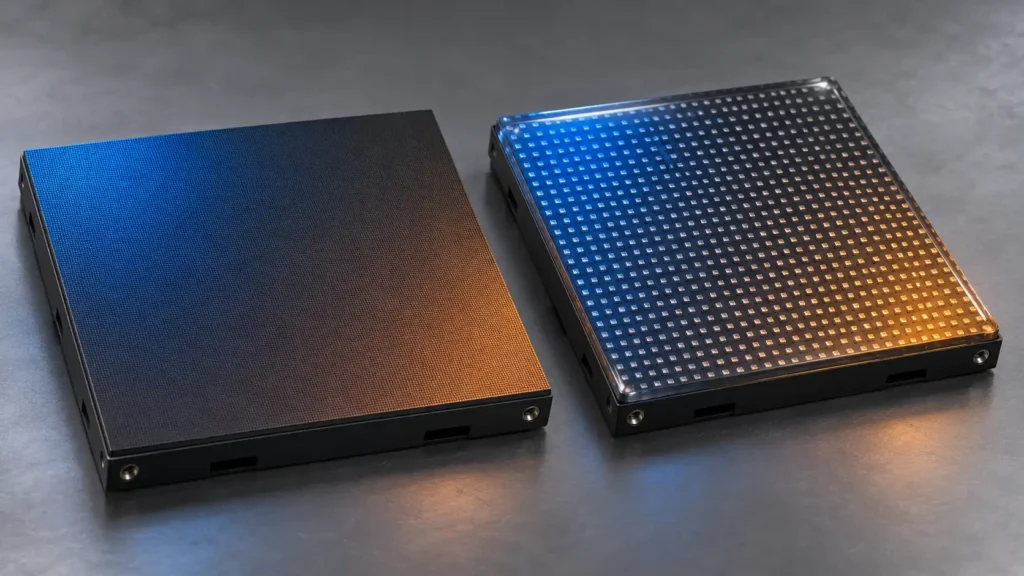
What Is a COB LED Display?
COB stands for chip on board. Instead of mounting individually packaged SMD LEDs, manufacturers integrate LED chips directly onto the substrate and encapsulate the display surface.
COB designs include different chip structures and manufacturing processes. Flip-chip COB is one configuration, so buyers should ask what construction a quotation actually includes.
This approach is widely associated with fine-pitch indoor displays. However, the COB label alone does not guarantee excellent contrast, low power consumption, or trouble-free operation. Those results depend on the complete product.
MIC’s fine-pitch COB LED display is a product option to evaluate for indoor projects requiring detailed imagery and close viewing.
What Is a GOB LED Display?
Glue on board (GOB). The module surface is coated with a protective layer of resin, which is usually applied around and to the existing SMD LED packages.
The basic module is still significant. When using resin, it will not convert an SMD assembly into chip-on-board construction. Usage is also different across industry, with some companies using protective finishes for other types of LED constructions. Do not assume that the abbreviation is sufficient, ask for a cross-section or manufacturing description.
While GOB can contribute to handling and surface exposure issues, protection relies on resin selection, coverage, curing and quality control.
| Comparison | COB LED display | GOB LED display |
|---|---|---|
| Main distinction | Direct chip integration | Protective surface coating |
| Typical construction | Chips encapsulated on a substrate | Often SMD LEDs beneath resin |
| Pixel pitch | Common in fine-pitch applications | Depends on the underlying module |
| Surface performance | Depends on encapsulation and finish | Depends on coating and finish |
| Repair approach | Often requires specialist chip-level work | May require resin removal and restoration |
Picture Quality: Look Beyond the Packaging Name
A protective surface can influence reflections, black appearance, and light distribution. Neither technology The better picture is automatically produced automatically.
This can cause lights to bounce off of the display in a bright reception area. Low-light, gray-scale and dark-scene detail could be important in a dim boardroom.
Request comparisons of samples under similar conditions:
Same pixels pitch and the same image size.
Equivalent operating brightness.
Identical source content.
Similar lighting and viewing angle for the room.
Use dark gradient, small text, skin tones and white background. Problems may become apparent in a spreadsheet right away, but can be hidden through a colorful demonstration video.
Check the screen also when it is turned off. Surface colour or gloss may be different between modules and could become visible.
Pixel Pitch Still Determines Native Detail
COB and GOB do not define resolution. Pixel pitch and physical dimensions determine the display’s pixel count.
For example, a nominal 4,800 mm-wide screen at P1.25 provides approximately 3,840 horizontal pixels. At P2.5, the same width provides approximately 1,920. Final dimensions must follow the actual module layout.
A GOB coating does not add pixels, and COB construction does not make every screen native 4K.
For broader indoor project planning, MIC’s MC-PRO indoor LED video wall provides another configuration to compare against viewing distance, content, and installation requirements. Confirm the proposed packaging separately.
Protection: What Does the Specification Actually Cover?
Both constructions can offer protected surfaces, but phrases such as “waterproof” or “impact-resistant” need supporting conditions.
A protected front surface does not establish the protection rating of the rear cabinet, connectors, or complete installation. Likewise, resistance to incidental contact does not mean a screen can tolerate arbitrary impacts.
| Project risk | What buyers should verify |
|---|---|
| Accidental contact | Documented test method and limits |
| Dust exposure | Applicable enclosure rating and cleaning guidance |
| Humidity | Permitted conditions and storage procedures |
| Cleaning | Approved materials, pressure, and chemicals |
| Outdoor exposure | Complete system rating, drainage, and temperature limits |
Don't approve an outdoor installation based only on a coated module demonstration.
Maintenance Can Change the Buying Decision
Front service describes access. It does not necessarily mean an individual pixel can be repaired on site.
With COB, chip-level repair may require specialist equipment and controlled processes. With GOB, reaching a failed component may involve removing resin and restoring the surface afterward.
The practical maintenance plan may therefore involve replacing a module and returning the failed unit for repair.
Ask about turnaround time, spare stock, calibration, and replacement appearance. A repaired module that works electrically can still look different from its neighbors.
For permanent installations, MIC’s MC-S indoor fixed LED display offers another product route to assess alongside service access and spare-parts requirements.
Cost: Compare Equivalent Systems
There is no universal price gap between COB and GOB. Pitch, component quality, manufacturing yield, processing, and support all affect the quotation.
| Cost category | Useful comparison |
|---|---|
| Display hardware | Same dimensions, resolution, and brightness |
| Installation | Structure, cabling, alignment, and commissioning |
| Operation | Typical power under matching conditions |
| Spares | Recommended quantities and calibration |
| Repairs | Labor, shipping, surface restoration, and downtime |
A lower initial price may still suit the project. Just make sure the maintenance assumptions are realistic.
Which Should You Choose?
Use COB when fine pitch integration, and close viewing image performance, are major concerns.
When a suitable underlying module is developed to fit the visual requirements, surface protection to provide extra protection should be considered when a handling risk exists.
Because ordering on the basis of actual content, uniformity, defective pixels, surface appearance, and replacement modules is essential, test them beforehand and agree to the acceptance criteria.
Frequently Asked Questions
Is COB better than GOB?
Not in every application. Compare equivalent products against viewing conditions, protection requirements, service support, and total cost.
Is GOB the same as SMD?
No. SMD describes packaged components mounted on a board. GOB commonly adds protection over that assembly.
Does COB always provide higher resolution?
No. Resolution depends on pixel pitch and screen dimensions, not the packaging name alone.
Are COB and GOB screens waterproof?
Only claim the protection supported by the specific product’s rating. Surface encapsulation does not establish complete-system waterproofing.
Can GOB modules be repaired?
Some can, but resin removal and restoration may require specialist work. Confirm the supplier’s procedure and warranty.
Is COB always more energy-efficient?
No. Compare typical consumption at equivalent brightness, screen area, content, and operating settings.
Which is better for rental screens?
Evaluate handling protection alongside cabinet weight, rigging, alignment, transport, and repair speed. Packaging is only one part of rental suitability.
What should I request before purchasing?
Request a sample demonstration, confirmed specifications, protection documentation, maintenance instructions, spare-module pricing, and written acceptance criteria.
Share on Social:


Contact Us
In This Article
Related Posts
How to Choose the Right Pixel Pitch Based on Viewing Distance
November 14, 2026
Corner Protection Rental LED Panel: Damage Prevention and Maintenance Guide
October 30, 2026
How to Choose a Shop Window Transparent LED Display for Retail Stores
October 29, 2026
Iron vs. Aluminum Outdoor LED Display Cabinets: How to Choose
October 28, 2026


