




Front Service vs Rear Service LED Display
By hqt
Nov 19, 2026Related Posts

How to Choose the Right Pixel Pitch Based on Viewing Distance
November 14, 2026
Corner Protection Rental LED Panel: Damage Prevention and Maintenance Guide
October 30, 2026
How to Choose a Shop Window Transparent LED Display for Retail Stores
October 29, 2026
Iron vs. Aluminum Outdoor LED Display Cabinets: How to Choose
October 28, 2026
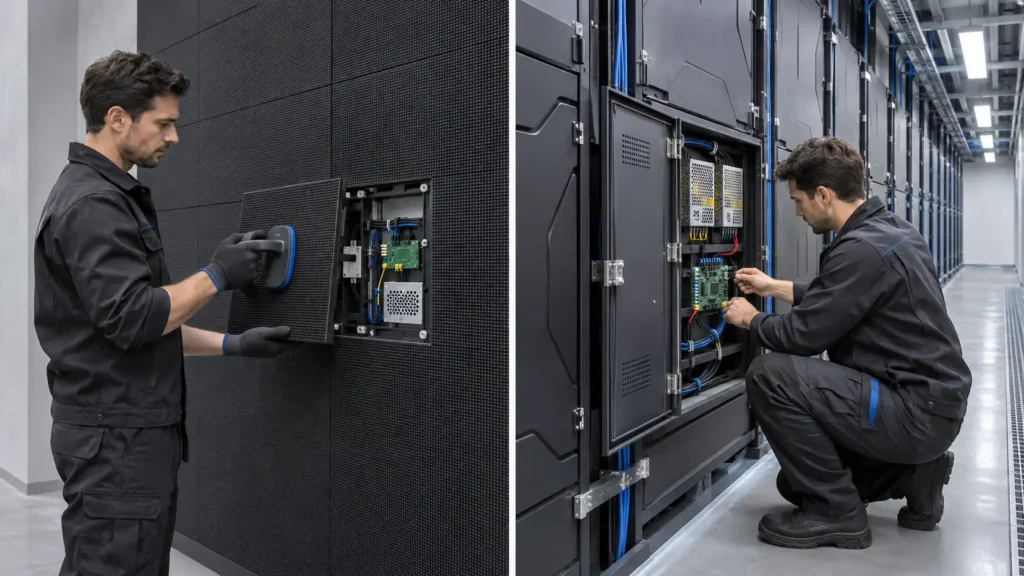
A front-service LED display makes it possible to reach certain parts from the front of the screen. This LED display is for the rear service, which puts the technicians behind the screen. Rear access can be useful if there is a dedicated maintenance area available, or if the installation is in front of a wall.
“Specified” is the keyword. Just because they are front-removable doesn't mean that all of the power supplies, receiving cards, and all cables can be serviced from the front as well.
The question to ask before deciding on either system is a practical one – how will a technician gain access to a failure?
How Front and Rear Maintenance Work
Front service involves the removal of modules or access panels off of the display face. This can be an approved magnetic extraction tool, suction equipment or mechanical fasteners depending on the design.
Rear-service cabinets are accessed from the rear. Manufacturers follow specific steps to access replaceable components, which technicians open the related enclosure.
Some displays can be accessed from both sides, providing greater flexibility when installing and maintaining the display.
| Factor | Front service | Rear service |
|---|---|---|
| Working position | In front of the screen | Behind the screen |
| Typical space advantage | Can eliminate a dedicated rear service aisle | Keeps maintenance activity behind the display |
| Common installation fit | Wall-mounted and recessed displays | Structures with accessible rear areas |
| Component removal | Through the front opening, where supported | Through rear doors or openings |
| Main planning concern | Clear working space at the display face | Safe access and sufficient rear clearance |
Neither method guarantees faster repairs. Accessibility, component layout, technician training, and spare availability all affect the result.
Front Service: Useful When Space Is Limited
In a reception area or retail store, reserving an aisle behind the screen may be impractical. Front access can help preserve usable floor space and support a shallower architectural installation.
MIC’s MC-S indoor fixed LED display is one option to evaluate for commercial projects requiring front maintenance.
However, a slim cabinet does not establish the complete installation depth. Brackets, cable routing, ventilation, and wall irregularities still need room.
Front servicing also requires clear access. A reception desk, display fixture, or decorative enclosure can obstruct module removal. Plan where technicians will stand and where removed components will be placed.
A screen that fits neatly into the architecture should remain practical to repair after the furniture arrives.
Rear Service: Effective with Proper Access
Rear maintenance can suit installations with a service room, accessible structure, or dedicated working platform.
Technicians may be able to inspect cables and components without occupying the audience area. This can be useful in operating venues, although maintenance may still require isolating power or taking part of the display offline.
The disadvantage is the space commitment. A narrow gap behind a screen is not automatically a usable maintenance area.
Allow for door movement, tools, component withdrawal, working posture, lighting, and entry routes. Elevated installations also need a suitable access arrangement.
There is no universal rear-clearance dimension. Request the actual cabinet drawings and maintenance requirements before finalizing the structure.
Confirm Exactly Which Components Are Accessible
“Front service” is sometimes used too broadly in quotations.
A module might detach from the front while an internal power supply remains accessible only from behind. That mismatch becomes expensive when the screen is already mounted against a finished wall.
| Component | What buyers should confirm |
|---|---|
| LED modules | Removal direction, tools, and handling procedure |
| Power supplies | Access route and required removal clearance |
| Receiving cards | Whether replacement is possible from the planned working side |
| HUB boards and connectors | Accessibility after mounting |
| Internal cables | Reach, identification, and replacement route |
| Cabinet hardware | Access for adjustment and inspection |
For presentation spaces, MIC’s MC-PRO indoor LED video wall provides another configuration to assess. Confirm the complete service procedure for the ordered model.
Ask for a maintenance demonstration. Watching a technician replace a power supply can answer questions that a product brochure leaves open.
Outdoor Displays Need Additional Planning
Front and rear service are both possible outdoors. The appropriate choice depends on building access, installation height, surrounding space, and the approved cabinet design.
MIC’s MC-PRO outdoor fixed LED display lists front and rear maintenance access, giving project teams an option to assess against site conditions. www.micleddisplay.com
Outdoor maintenance also involves restoring seals and closures correctly. Check how access affects weather protection and which inspections are required afterward.
Front access does not remove the need for lifting equipment on a high facade. Rear access does not help if reaching the service platform is difficult.
Compare Installation and Lifetime Costs
Front-service equipment can reduce the need for a rear maintenance aisle, but it is not automatically cheaper overall. Rear-service installations may be economical when suitable access already exists.
Compare complete projects rather than cabinet prices alone.
| Cost category | Questions to include |
|---|---|
| Supporting structure | Does the design require a walkway or service platform? |
| Architectural work | Are removable finishes or access openings necessary? |
| Maintenance equipment | Are specialist tools or lifts required? |
| Labor | How long does a typical component replacement take? |
| Business disruption | Must the public area or venue be closed? |
Spare modules, calibration records, and clear wiring documentation matter with either method. Easy access cannot compensate for unavailable replacement parts.
Choosing the Right Service Method
Choose front service when rear access is unavailable and the complete system supports maintenance from the viewing side.
Choose rear service when the site provides a practical, permanent working area behind the display.
Consider dual access where it solves a genuine installation or maintenance constraint. Before approving drawings, trace the replacement route for every major component—not just the LED modules.
Frequently Asked Questions
Is front service better than rear service?
It depends on the site. Front service saves rear access space; rear service can be practical where a suitable maintenance area exists.
Does front service mean every component is front-accessible?
No. Confirm modules, power supplies, receiving cards, connectors, and cables separately.
How much space does rear maintenance require?
Use the manufacturer’s drawings and actual working requirements. There is no single clearance suitable for every cabinet.
Can a rear-service screen be mounted directly against a wall?
Only if another approved arrangement provides the required access. Otherwise, essential components may become unreachable.
Does the maintenance method affect image quality?
Not directly. Pixel pitch, components, processing, calibration, and alignment determine the image. Service design affects how that performance is maintained.
Can technicians replace modules while the screen operates?
Follow the manufacturer’s electrical isolation procedure. Do not assume hot replacement is supported.
Can an existing rear-service display become front-service?
Do not assume conversion is possible. Module retention, cabinet openings, wiring, and component layout may prevent it.
What should I request before ordering?
Request service drawings, a component access list, tool requirements, a replacement demonstration, spare-parts pricing, and written maintenance instructions.
Share on Social:


Contact Us
In This Article
Related Posts
How to Choose the Right Pixel Pitch Based on Viewing Distance
November 14, 2026
Corner Protection Rental LED Panel: Damage Prevention and Maintenance Guide
October 30, 2026
How to Choose a Shop Window Transparent LED Display for Retail Stores
October 29, 2026
Iron vs. Aluminum Outdoor LED Display Cabinets: How to Choose
October 28, 2026


