




What to Check Before Buying a Rental LED Display Package
By hqt
Oct 20, 2026Related Posts
How to Choose the Right Pixel Pitch Based on Viewing Distance
November 14, 2026
Corner Protection Rental LED Panel: Damage Prevention and Maintenance Guide
October 30, 2026
How to Choose a Shop Window Transparent LED Display for Retail Stores
October 29, 2026
Iron vs. Aluminum Outdoor LED Display Cabinets: How to Choose
October 28, 2026
It is possible to have a complete quotation for a rental LED wall by listing the display area and the quantity of cabinets. The first event might be the one that will uncover all that was missing from the list: an appropriate processor, adequate cables, hanging hardware, transport cases or replacement parts.
Rental LED Display Package is the aggregate of compatible equipment which is required to transport, assemble, operate and maintain the temporary screen. You will not find a single package that can be applied to all the events. The question is if the particular screen you're company wants to rent can be provided by the items being quoted.
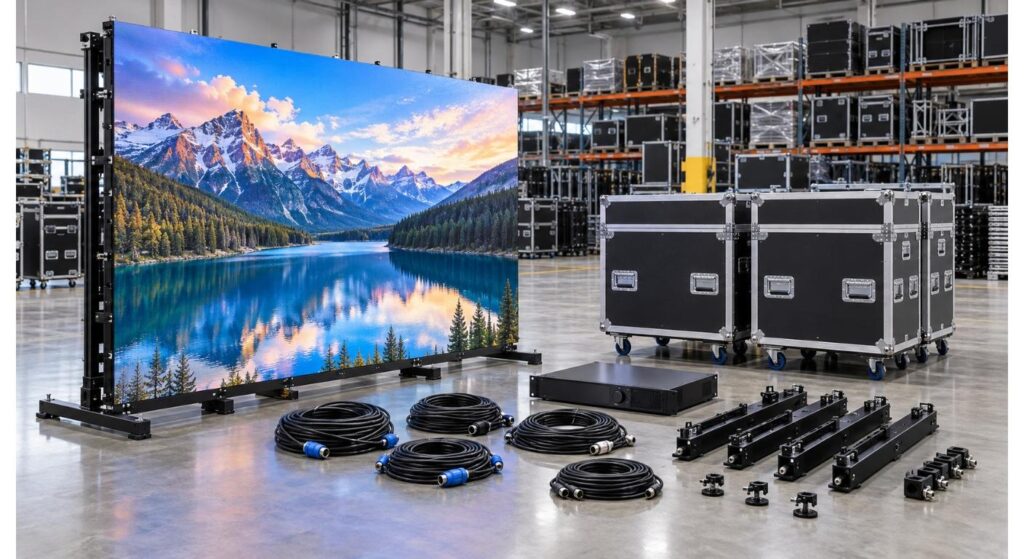
Determine what the Screen the Package Must Deliver
Start with a single job, like a conference background or a concert screen outdoors. Indicate its size (how wide and high it is) and venue constraints, closest viewers, what it will contain and if cameras will record it. Request the supplier to demonstrate how the suggested cabinets create that screen, what its last pixel size is.
This example provides a clear context for the quotation. If you think you may want to use two smaller screens to split your inventory, specify both. The cabinet count alone may be adequate and the amount of proposed control equipment, or power distribution/mounting accessories may not be adequate for simultaneous operation.
Select screen series as per job requirement. The range of rental LED displays that MIC offers are broken down into three groups: indoor, outdoor and flexible – these are not a single package that can be swapped back and forth, but rather should be taken into consideration depending on the venue and viewing requirements.
Make the Cabinet List Specific:
The identification of the product series, the pixel pitch, the cabinet size and the number of cabinets should be specified in a cabinet line item. Inquire about the cabinet specification for each cabinet, and whether cabinets of varying size are designed to coordinate with each other. Check the number of full screens that the stock quoted can be made with no borrowing from other sets.
For instance, MIC's MCR-S indoor event rental screen is featured with 500 × 500 mm, 500 × 1000 mm cabinets and a variety of pixel pitches. All those details can assist a buyer in talking about layouts, but the last quotation should specify the exact variant and quantity to be supplied.
Look to see if any of this is already installed on the cabinets. Handles, locks and power connections could be a part of the cabinet design or could show up as part of the quote for the separate accessories. Photographs of a built up wall are not the same as what will be in each case.
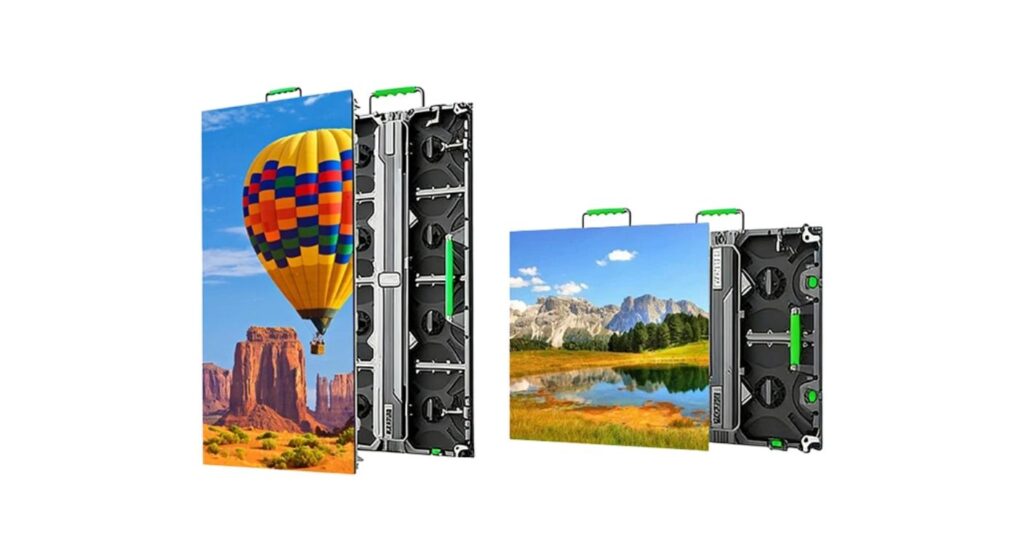
Include the entire signal path into the consideration.
Trace the contents from its sources to the LED modules. Recognise input devices, video processor, sending equipment (if necessary), receiving system, signal cables. Have the supplier specify the number of inputs that can be supported and the pixel capacity of the screen size that you plan to use.
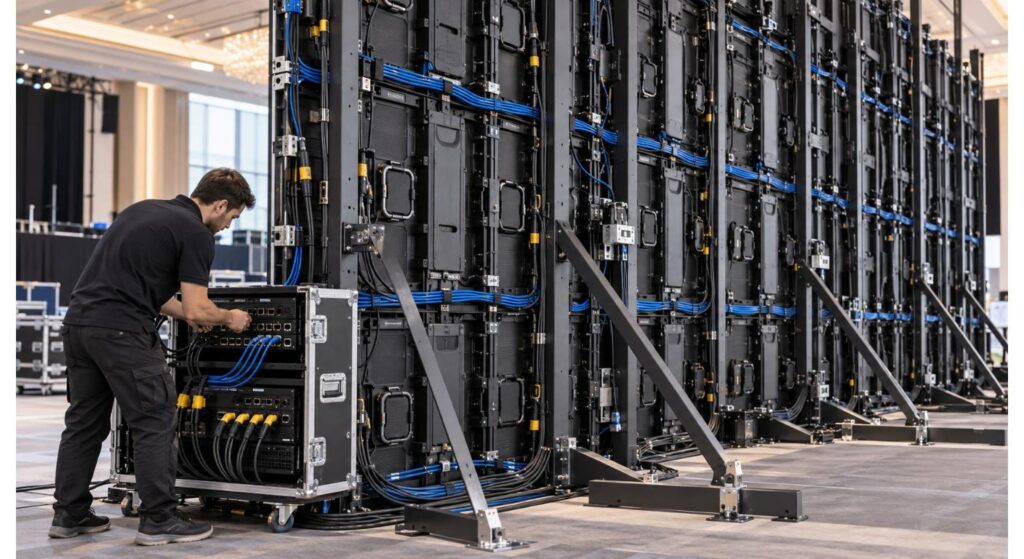
The processor shall not only be described as “included,” but shall be the processor used in the real canvas. If the package will be used to generate a main wall and side screens separately, then ensure the control plan will provide those outputs. Be sure to look at how a technician will back up and restore the screen configuration after moving equipment between events.
Quantities and lengths of cables are required. If the control position is not guaranteed to reach the display, then there are not enough short cabinet links. Ask for a cable schedule separating signal runs from connections between cabinets.
| Item | Required specification or quantity | Included in quote? |
| Video processor | Model, inputs, output capacity | |
| Sending/receiving system | Model and compatibility | |
| Main signal runs | Quantity and length | |
| Cabinet signal links | Quantity and spare allowance |
Verify Power and installation hardware
Inquire about power needs, and the type and quantity of power cables included. The supplier should describe the circuits of the proposed screen, and the equipment required from the venue and/or local contractor. Just a cabinet specification doesn't give you the full picture of the site power setup.
The type of installation hardware will vary depending on how the wall will stand. A suspended screen may involve hanging bars and rigging arrangements that are compatible; a ground-supported screen will require a suitable ground supporting structure. Verify what is supplied and what is optional and what must be designed and/or approved for each site.
Please don't expect that the package on a stage is ready to be installed in any venue. The event team should make sure that the suggested method of mounting is verified, site structure and access and applicable safety requirements for the job.
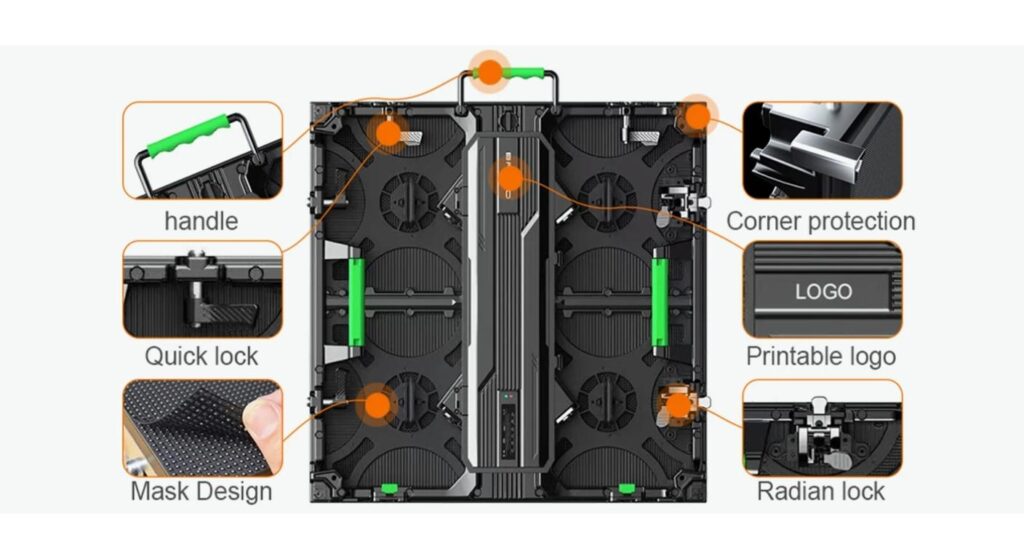
Take Transport and Turnover line into the Quote
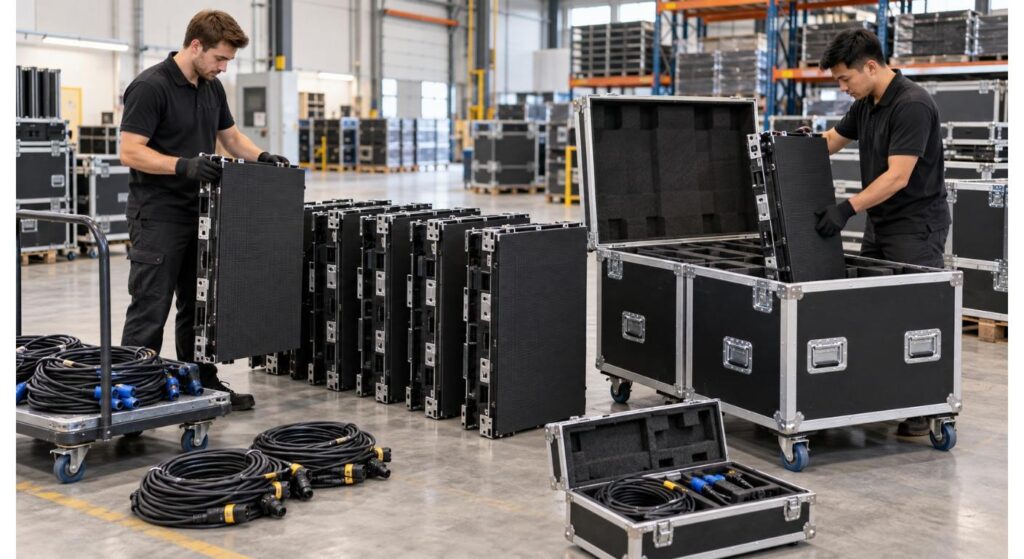
Flight cases preserve the inventory and enable a crew's loading process to be repeated. Ask for the number of cases, the capacity of each case and the weight of each packed case. See if there is protected space for cables, bars or other accessories or if these must be additionally housed in cases.
Consideration of what comes after a show. Testing cabinets can be visually inspected and counted before loading, and tested again at the warehouse. A transparent case plan will enable the staff to see what equipment is missing before the next dispatch. It also facilitates a transport cost estimate that is more easily made than a quotation simply related to display area.
The package should simulate the manner in which your company actually transports equipments. When screening companies buy the same case & accessories, they may still require different arrangements depending on the type of operation they have, e.g. a local event supplier may need a different setup to a touring company.
For example, set the Spares and a Repair Route.
Service items become a part of the working package as they are used again and again. Inquire about the recommended spare parts, power supplies, receiving parts and cables for the number of screens you purchase. Ensure replacements are exactly the one supplied and determine how to order compatible replacements for the future.
Inquire about how to get to parts after the wall is erected as well. The applicable maintenance approach for an event is still dependent on the proposed installation method and access at the event, and MIC describes front and rear maintenance for their MCR-S indoor series.
A spare can only be of assistance if the crew can detect a fault, and if they can safely reach the faulty part and replace it. Discuss the tools and technical documentation required in the package.
Get a comparison of quotes for the same scope.
First of all, for comparing the price, give the same target layout to all suppliers and request an itemized response. Include equipment separately; optional equipment and equipment to be supplied by buyer. Ask for model numbers or exact details of the processors, cabinets, cases and important accessories.
Now check the quotation with a full event: move equipment, erect wall, join content and power, operate the show, deal with fault, dismantle the wall and pack the equipment again. If a step requires an item not included in the list, any such step should be explained prior to ordering.
The screen layout to be produced can be sent to MIC's contact page and a quotation based on the screen's configuration can be requested there. The answer should be sufficient to make the scope you provided clear to your technical team.
| Package item | Supplied | Optional | Buyer/site provides |
| LED cabinets and fitted components | |||
| Control equipment and cables | |||
| Power cables and distribution | |||
| Hanging or ground-support hardware | |||
| Flight cases | |||
| Spare parts and tools |
Conclusion
The complete performance of the components is the essence of an LED display package for rent. Always begin with a defined event screen and then look for the cabinets, signal path, power connections, mounting equipment, cases and spares as one system. An itemized quote exposes the lack of equipment up front before it is an issue on the first job.
FAQs
Q1. Do you need to have a video processor in every LED display rental package?
No - contents of each package are subject to change from one quotation to another. Request the processor model, inputs and capacity in written form.
Q2. Do they include flight cases normally?
Don't presume that they are. Check the number of cases and the cabinets' capacity and if accessories can be protected separately.
Q3. Is it possible to make two screens with the same package?
Maybe, depending on the layout of the cabinet, controllers and outputs, cables and power plan. Ask supplier to demonstrate the two screen setup.
Q4. If a spare module is built into the initial order, should a spare module be on order as well?
They're worthy of a discussion for a very often leased monitor. Ask for recommendations of compatible spare-parts according to the exact model and number of items bought.
Q5. Which is the most crucial document to be sought prior to pay?
An itemized BOM (bill of materials) related to your screen layout. It should differentiate supplied items, optional items and equipment supplied on site.


Contact Us
In This Article
Related Posts
How to Choose the Right Pixel Pitch Based on Viewing Distance
November 14, 2026
Corner Protection Rental LED Panel: Damage Prevention and Maintenance Guide
October 30, 2026
How to Choose a Shop Window Transparent LED Display for Retail Stores
October 29, 2026
Iron vs. Aluminum Outdoor LED Display Cabinets: How to Choose
October 28, 2026


