




How to Choose a Rental LED Display?
By miashuvo2077
Oct 08, 2026Related Posts

LED Window Display- The Complete Guide for Retail, Advertising, and Commercial Spaces
October 26, 2026

Mini LED Display- What It Is, How It Works, and Where It Fits
October 26, 2026
Naked Eye 3D LED Display - How It Works, Key Specs, Cost and How to Plan One (2026 Guide)
October 16, 2026

Transparent LED Displays for Storefronts
October 14, 2026
Rental LED display selection comes down to matching six factors to both the event and your fleet: indoor or outdoor use, pixel pitch against the closest viewing distance, cabinet size and weight, the locking and alignment system, curve capability, and durability across repeated transport and setup. Confirm each factor against the actual model specification rather than a general industry rule before you commit.
Key Takeaways
- Rental and fixed screens differ mainly in the use cycle — repeated assembly, transport and dismantling — which is what drives cabinet weight, locking design and maintenance access, according to Kinglight's August 2024 rental LED display guide.
- Choose the environment first, then verify the exact model's brightness and ingress protection. MIC Display's rental page lists ≥5000 nits and IP65 for its outdoor stage MCR-PRO series and ≥600 nits and IP40 for its indoor stage MCR-PRO series.
- According to Kinglight, pixel pitch is the distance between the centres of adjacent LED pixels, so smaller pitch means higher pixel density and supports closer viewing — not automatically a better fit.
- Cabinet size and weight decide crew size, build height and transport space. MIC Display's rental page lists 250 × 250 mm modules for the rental series shown there.
- In rental use, durability is judged on the cabinet frame, module seating, connectors, locking points and corners — the parts that take handling stress.
What Is a Rental LED Display, and How Does It Differ From a Fixed Screen?
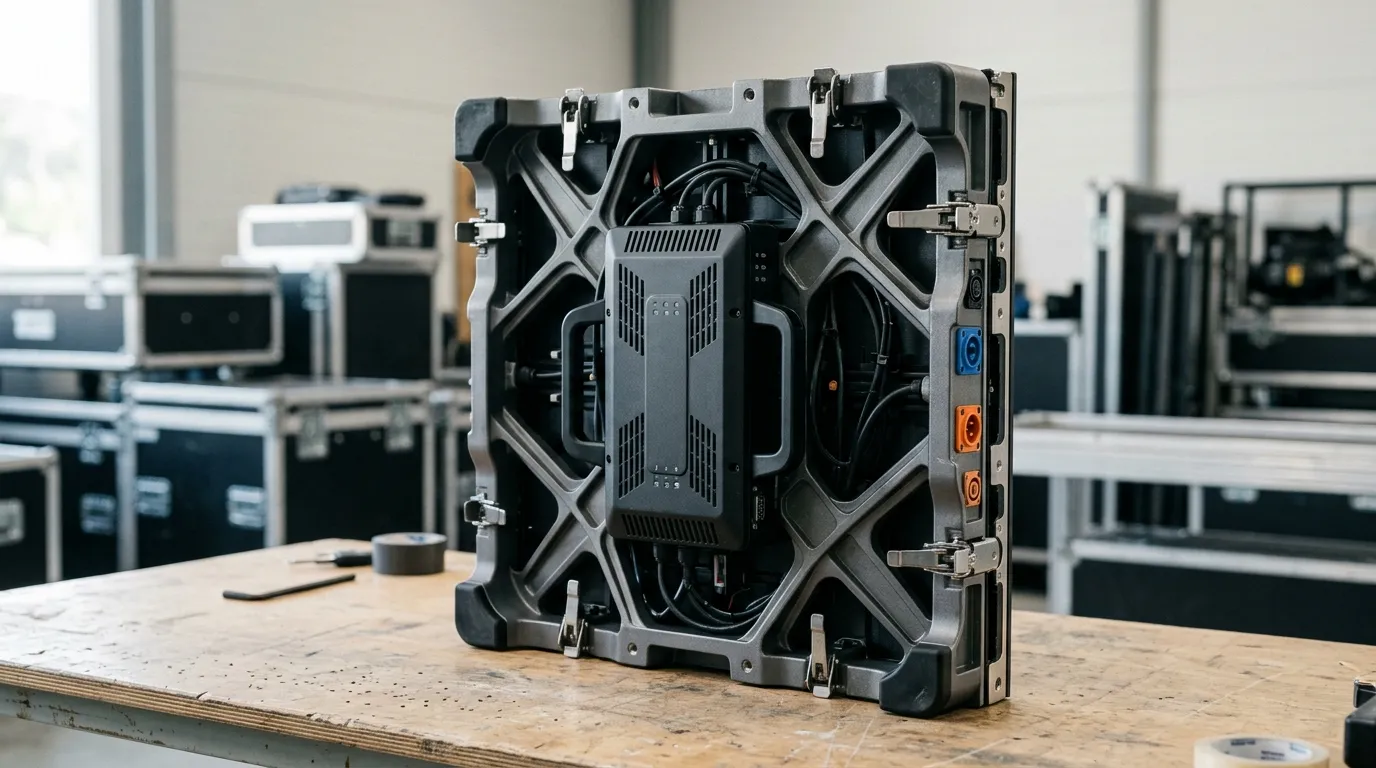
A rental LED display is a modular screen built to be assembled, used and dismantled repeatedly, while a fixed LED display is installed once for long-term use. That difference in the use cycle — not image quality alone — is what shapes cabinet weight, locking design, transport and maintenance.
MIC Display's rental LED display range covers concerts, festivals, exhibitions, conferences and stage events, and the same page lists indoor rental cabinet pitches from P1.953 to P3.91 and outdoor stage pitches from P2.604 to P4.81 as model ranges rather than recommendations for every event.
Kinglight lists cabinet weight, transport, locking, maintenance, viewing distance, content and camera use among the factors to consider when selecting a rental display. Its 2024 comparison table contrasts rental and fixed screens across purpose, installation, cabinet design, transport, configuration, maintenance and typical applications — useful evidence that the cabinet, not just the pitch, is the deciding difference.
Treat rental suitability as two separate questions: does the screen look right for this event, and does it suit the way your team builds, moves and stores panels every week.
[DlAGRAM: annotated rental cabinet showing the locking mechanism, LED module, power and data connection points, and corner protection]
Indoor or Outdoor: Match the Display to the Venue, Not the Catalogue
Choose the environment first: indoor rental displays suit controlled lighting and closer audiences, while outdoor rental displays must handle daylight, weather exposure and longer viewing distances. Then verify the specific model's brightness, ingress protection and cooling instead of assuming the category guarantees the performance.
According to HSCLED's rental LED display guide, published in December 2025, outdoor rental displays commonly use high brightness and weather protection, with IP65 given as an example. That is that guide's general description, and it does not mean every outdoor cabinet carries the same rating. Ingress protection (IP) is a two-digit rating for resistance to dust and water, and it applies to a specific cabinet design, not to a product category.
MIC Display's rental page lists separate indoor and outdoor stage series with different figures: ≥5000 nits and IP65 for the outdoor stage MCR-PRO series, and ≥600 nits and IP40 for the indoor stage MCR-PRO series. Those are series-specific page specifications, so read them as worked examples of how far indoor and outdoor figures can differ.
| Use condition | What to verify on the exact model | Why it matters |
|---|---|---|
| Indoor, controlled light | Pitch against closest viewing distance; brightness suited to dimmer ambient light | High outdoor brightness is unnecessary here and can be visually harsh |
| Indoor, filmed or broadcast | Refresh rate and scan behaviour as well as pitch | Low refresh produces banding on camera |
| Outdoor, shaded or evening | Brightness and IP rating stated for that cabinet | Shade reduces glare but not rain or dust exposure |
| Outdoor, direct sun and weather | Brightness, IP rating, cooling and cabinet sealing | Daylight washes out low-brightness screens; exposure stresses every seal |
Decision rule: ask for the datasheet figures for brightness and IP on the exact cabinet you are pricing, and match them against the venue's real conditions — direct sun, rain, dust or shade — rather than accepting a category-level claim.
If you work across both environments, compare a dedicated indoor rental LED display series against an outdoor rental LED display series, and decide whether one line really covers your calendar or whether you need both. Repeated-handling durability is covered in "Durability Across Repeated Setups".
Match Pixel Pitch to Viewing Distance and Content
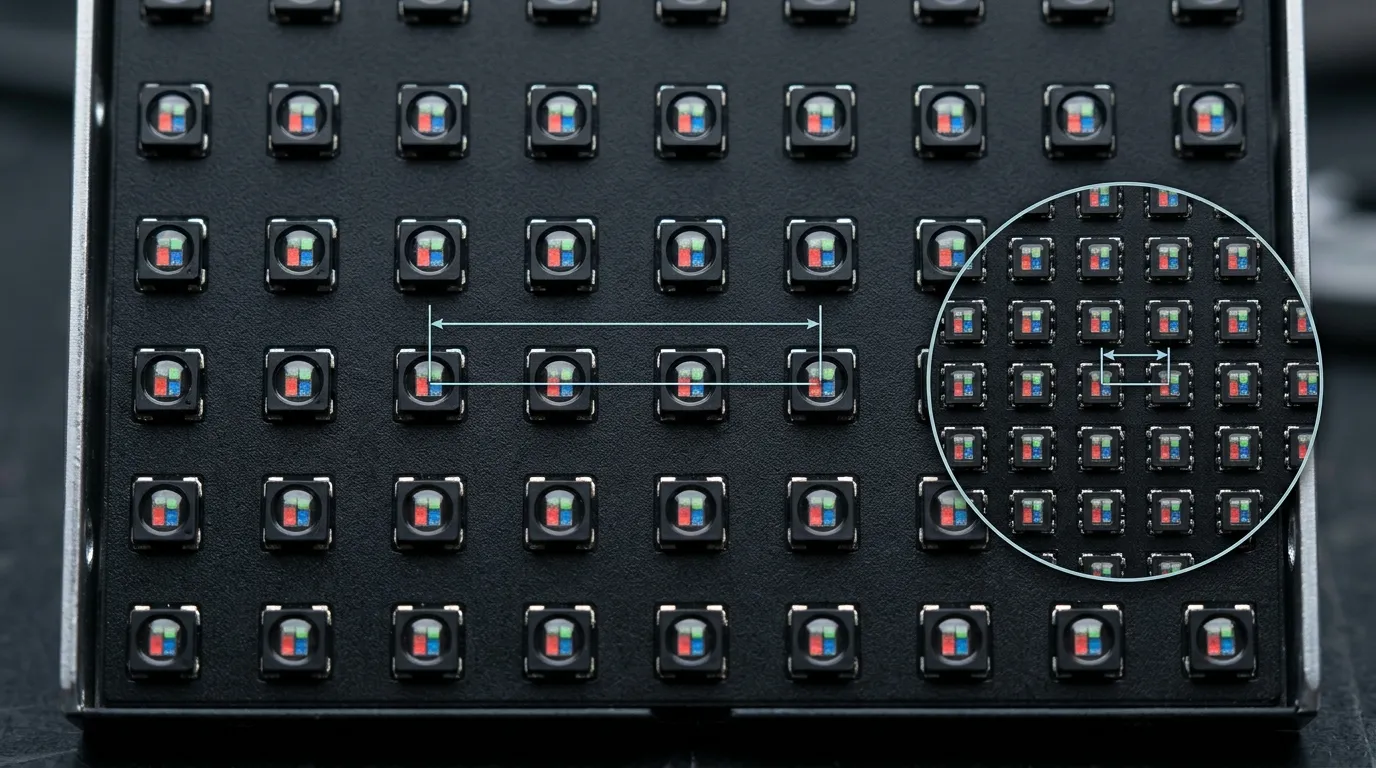
Pixel pitch is the distance between the centres of adjacent LED pixels, and a smaller pitch packs more pixels into the same area, supporting closer viewing and finer detail. Set the pitch from the closest audience position and the finest detail your content must show, not from what happens to be available.
Kinglight defines pixel pitch as the centre-to-centre distance between adjacent pixels and explains that smaller pitch means higher pixel density. Its guide also lists viewing distance and content type among the factors to consider, which is the practical link between a number and a decision: a large-format brand loop watched from 30 metres has very different pitch needs from a stage backdrop watched from five.
MIC Display's listed rental ranges — P1.953 to P3.91 indoor and P2.604 to P4.81 outdoor — show how wide that spread is across one manufacturer's models. Use a pitch-to-distance method such as the LED pixel pitch guide to translate a viewing distance into a target range, then confirm the result against the exact cabinet.
If Cameras Are Involved: Refresh Rate
When the screen will be filmed, refresh behaviour matters as much as pitch, because low refresh produces banding on camera. MuenLed's guide, labelled as 2025 guidance, recommends more than 3840 Hz refresh for camera-related use; treat that as that source's recommendation rather than a universal requirement. Confirm refresh rate and scan behaviour on the exact model whenever the event is broadcast or filmed.
Cabinet Size and Weight: What Your Crew and Transport Can Handle
Cabinet size and weight decide how many people a single panel needs, how high a wall can be built safely, and how much truck or storage space a fleet consumes. Check the per-cabinet figure rather than only the total screen size on the quote.
Kinglight lists cabinet weight and transport among the factors to consider when selecting a rental display. MIC Display's rental page lists 250 × 250 mm modules for the rental series shown there, which gives a concrete example of the module scale to compare against other cabinets. Ask for the weight of the assembled cabinet, not just the module, because frame and power components usually add most of the moving weight.
Screen Size, Cabinet Format and Installation Method
Screen size, cabinet format and installation method interact, so confirm all three together: the wall size you are quoting, the cabinet format you intend to order, and whether it will be ground stacked, rigged or built as a wall. A cabinet line that works for a 6 × 3 metre build may be impractical for a large ground-stacked wall.
Locking and Alignment: The Factor That Decides Setup Speed
A rental cabinet's locking and alignment system determines how fast a wall goes up and how flat the seams stay after dozens of builds. Ask how panels locate and lock, whether alignment is adjustable, and whether a single panel can be removed without dismantling its neighbours.
Kinglight lists locking among the selection factors to consider. MIC Display's rental page describes quick-lock and flexible cabinet options across its rental series, which is the kind of feature to confirm in writing for the exact cabinet you order.
ExcelLED's guide dated March 2026 advises buyers to evaluate durability and locking mechanisms for repeated rental handling, and it claims a locking system should withstand over 500 cycle tests. That cycle figure is not independently verified by any of the sources reviewed here, so do not present it as an industry benchmark. Instead, ask the supplier what locking mechanism type the exact cabinet uses and how it performs in service, and inspect a sample cabinet's connection points before ordering a fleet.
When Do You Actually Need Curve Capability?
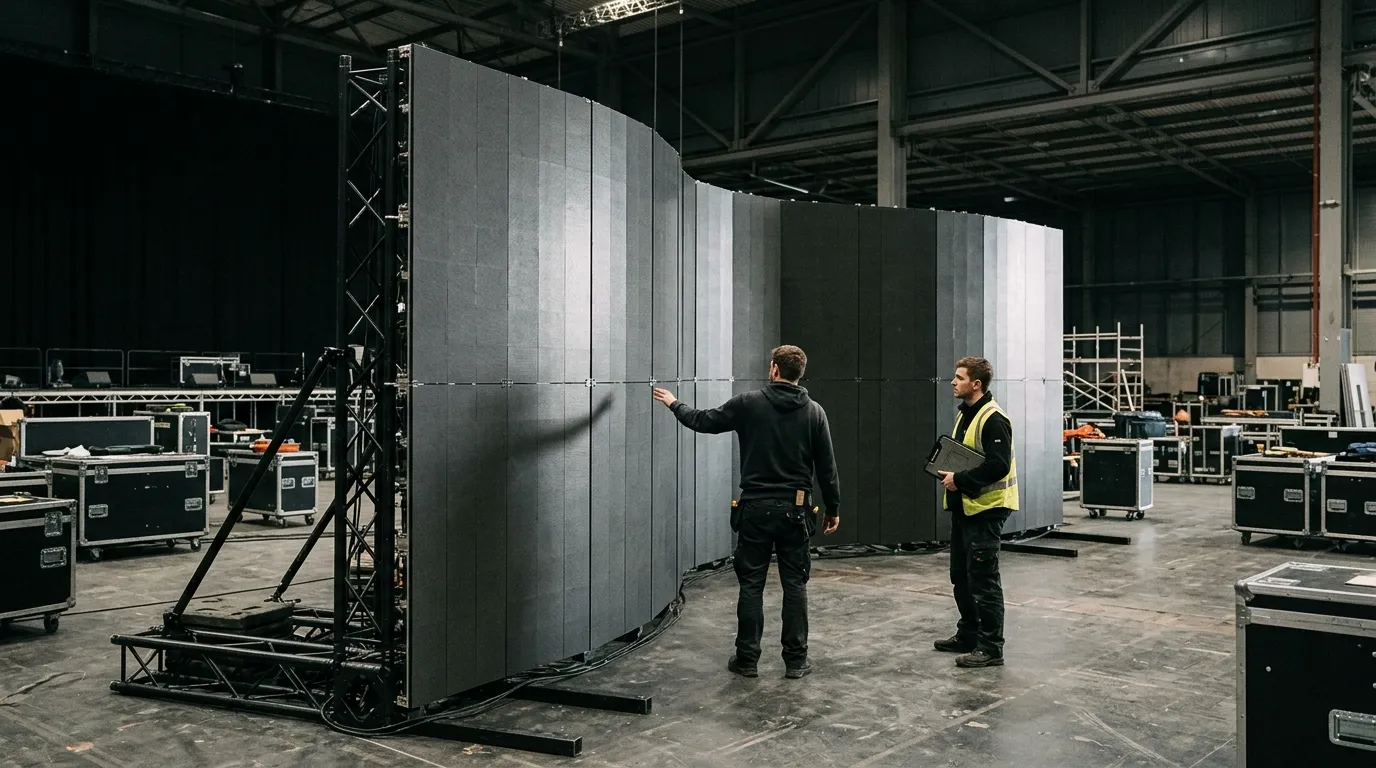
Curve capability matters only when the design calls for a concave, convex or wrap-around configuration. If the project needs it, confirm the exact cabinet's supported configuration and angle range; if it does not, a flat cabinet with a simpler locking system is usually the more practical fleet choice, because curve hardware adds parts to check and maintain.
MIC Display's rental page lists flexible cabinet options within its rental series, and the product pages for a flexible indoor rental led screen and a flexible outdoor rental led screen show how curve-capable cabinets sit inside that range.
Decision rule: confirm the supported curve angle and configuration for the exact cabinet before ordering. A series-level "curved" label is not sufficient evidence for a specific shape, and an outdoor curve cabinet still needs its own brightness and IP check against the section above.
Durability Across Repeated Setups
Rental screens are stressed by transport and handling, so durability should be judged on the parts that take the abuse: cabinet frame, module seating, connectors, locking points and corners. Running hours matter less than how the screen survives being struck, stacked, flown and rebuilt.
ExcelLED's March 2026 guide says buyers should evaluate durability and locking mechanisms for repeated rental handling. Kinglight's 2024 guide lists maintenance among the selection factors and covers cabinet design, transport and maintenance in its rental-versus-fixed comparison table.
Decision rule: ask which components are field-replaceable and whether maintenance access is front, rear or both on the exact model. A cabinet whose modules can only be reached from behind may need to be unrigged before a single failed module is swapped, which changes crew time on event day.
[DlAGRAM: viewing-distance versus pixel-pitch diagram showing closest and farthest audience positions relative to the screen]
Rental LED Display Selection at a Glance
Use this table to check each requirement against what must be verified on the exact cabinet before you buy.
| Selection factor | What to verify on the exact model | Why it matters | Sourced example |
|---|---|---|---|
| Indoor or outdoor environment | Cabinet series rated for the venue | Indoor and outdoor figures differ substantially | MIC Display lists separate indoor and outdoor stage MCR-PRO series |
| Pixel pitch | Pitch against closest viewing distance | Drives detail quality and cost | MIC Display lists P1.953–P3.91 indoor and P2.604–P4.81 outdoor stage |
| Brightness (nits) | Figure stated for that cabinet | Daylight washes out low-brightness screens | ≥5000 nits outdoor stage, ≥600 nits indoor stage (MIC Display) |
| Ingress protection (IP) | Rating stated for that cabinet | Dust and water exposure stress seals | IP65 outdoor stage, IP40 indoor stage (MIC Display) |
| Cabinet size and weight | Per-cabinet weight and dimensions | Sets crew size, build height and transport space | Verify with the supplier |
| Module size | Module dimensions | Affects replacement granularity and spares | 250 × 250 mm modules listed for the rental series shown (MIC Display) |
| Locking and alignment | Mechanism type and adjustment | Sets setup speed and seam flatness | Quick-lock and flexible cabinet options listed (MIC Display) |
| Curve configuration | Supported shape and angle range | Determines whether a curved build is possible | Verify with the supplier |
| Refresh rate | Figure for the exact model when filmed | Low refresh bands on camera | Above 3840 Hz recommended by MuenLed's 2025-labelled guide |
| Maintenance access | Front, rear or both; field-replaceable parts | Affects service time during events | Verify with the supplier |
Rental Fleet Checklist: What to Verify Before You Buy
Before adding a model to a rental fleet, check it against your own operations rather than only the next event: crew size, transport, storage, spares and how often the panels will be rebuilt.
- Get the exact model datasheet: pitch, brightness, IP rating, cabinet weight and module size.
- Map the model against your typical indoor and outdoor jobs, and decide whether one series covers both or you need two.
- Confirm handling: weight per assembled cabinet, people needed, flight-case size and truck fit.
- Confirm build speed: locking type, alignment adjustment and whether a single panel can be removed in place.
- Confirm shape needs: flat-only or curve-capable, and the supported curve configuration for any curved work.
- Confirm maintenance access and which parts are field-replaceable between jobs.
- Plan spares for modules, power and data connectors, and locking components.
- Check compatibility with cabinets already in your fleet, including pitch, cabinet format and control.
- Collect documentation: spec sheet, warranty terms and the technical support route for questions.
MIC Display is an LED display factory established in 2011 that designs, produces and sells indoor, outdoor, rental, fine-pitch COB, transparent, LED floor tile and LED poster displays, and it serves rental and event companies as well as integrators and project owners. Its design team customizes screen structure, size and configuration to each project's installation environment, and its displays carry a 5–8 year warranty with remote technical support and after-sales service. If you want to check specific rental cabinet options against the criteria above, review the rental range and compare the figures on the datasheets before deciding.
Frequently Asked Questions
Can one rental LED display be used both indoors and outdoors?
Generally, no — the same cabinet is not usually suited to both. Indoor and outdoor rental models differ in brightness, ingress protection and often cabinet sealing. MIC Display's rental page lists separate indoor and outdoor stage series with different brightness and IP figures. Choose the cabinet rated for the harsher environment you actually work in.
Does a smaller pixel pitch always mean a better rental screen?
No. Pitch should match the closest viewing distance and the finest detail your content must show. According to Kinglight, pixel pitch is the centre-to-centre distance between adjacent LED pixels, and smaller pitch means higher pixel density — a finer image, but also a cost that long viewing distances may not justify.
What is the first specification to confirm when comparing rental cabinets?
Confirm the exact model's datasheet rather than the series name. For outdoor work, start with brightness and ingress protection; for indoor work, start with pitch against the closest audience position. Then compare cabinet size and weight, module size, locking design and maintenance access before deciding, because those decide fleet practicality.
Share on Social:


Contact Us
In This Article
Related Posts
LED Window Display- The Complete Guide for Retail, Advertising, and Commercial Spaces
October 26, 2026
Mini LED Display- What It Is, How It Works, and Where It Fits
October 26, 2026
Naked Eye 3D LED Display - How It Works, Key Specs, Cost and How to Plan One (2026 Guide)
October 16, 2026
Transparent LED Displays for Storefronts
October 14, 2026


